Week 11 Tutorial: Iterators, Generators, and Context Managers
Problem 1 (Easy): Repeat Word Iterator
You are building a simple text tool. Create a class called RepeatWord that takes a word and a number n, and produces that word exactly n times when used in a for loop. Implement the iterator protocol.
__init__accepts two parameters:word(a string) andn(how many times to repeat).- Implement
__iter__that returnsself. - Implement
__next__that returns the word on each call, and raisesStopIterationafterntimes.
Input
for w in RepeatWord('hello', 4):
    print(w)
Expected Output
hello
hello
hello
hello
Problem 2 (Easy+): Star Pyramid Generator
You are building a display for a text-based art tool. Write a generator function called pyramid that takes a number rows and yields strings of * characters, starting from "*" and adding one more star on each row.
- The function accepts one parameter:
rows. - Use
yieldto produce a string ofistars on each step, whereigoes from1torows.
Input
for line in pyramid(5):
    print(line)
Expected Output
*
**
***
****
*****
Problem 3 (Medium): Bordered Section Context Manager
You are building a console reporting tool. Create a context manager class called BorderedSection that prints a decorative top border with a title when the with block starts, and a bottom border when it ends.
__init__accepts one parameter:title(a string).__enter__prints"=== <title> ==="and returnsself.__exit__prints"="repeated to match the length of the top border. It should not suppress exceptions.
Input
with BorderedSection("Results"):
    print("Score: 95")
    print("Grade: A")
Expected Output
=== Results ===
Score: 95
Grade: A
===============
Problem 4 (Medium): Tag Wrapper with `@contextmanager`
You are building a simple HTML renderer for the console. Write a generator-based context manager using the @contextmanager decorator that prints an opening HTML tag when the block starts and a closing tag when it ends — even if an error occurs inside.
- Import
contextmanagerfromcontextlib. - Create a function
tagthat accepts one parameter:name(the tag name). - Print
"<name>"beforeyield, and"</name>"after. - Use
try/finallyso the closing tag always prints.
Input
with tag("body"):
    with tag("h1"):
        print("Welcome")
    with tag("p"):
        print("Hello world")
Expected Output
<body>
<h1>
Welcome
</h1>
<p>
Hello world
</p>
</body>
Problem 5 (Medium): Batch Iterator
You are building a data processing tool. Create a reusable iterator system that takes a list and a batch size, and yields sublists (batches) of that size. The last batch may be smaller if there aren’t enough elements left.
- Create a class
BatchIteratorthat implements__iter__and__next__. It stores the data list and the batch size. Each call to__next__slices the firstbatch_sizeelements off the front of the list and returns them. When the list is empty, raiseStopIteration. - Create a class
Batchedthat stores the original data and batch size. Its__iter__must return a newBatchIteratoreach time so the object can be looped over multiple times.
Input
b = Batched([1, 2, 3, 4, 5, 6, 7], 3)

for batch in b:
    print(batch)

print('---')

for batch in b:
    print(batch)
Expected Output
[1, 2, 3]
[4, 5, 6]
[7]
---
[1, 2, 3]
[4, 5, 6]
[7]
Problem 6 (Medium+): Cash Register with Generator-Powered Context Manager
You are building a point-of-sale system. Create a context manager class CashRegister that internally uses a generator with send() to track a running total. When the with block ends, it prints a full transaction report.
__init__accepts one parameter:name(register label).- Create a protected generator method
_accumulatorthat starts a running total at0. In an infinite loop it receives a value viayield, adds it to the total, and yields the new total. __enter__creates the generator, starts it withnext(), initializes an empty history list, and returnsself.- Implement an
add(amount)method that callssend(amount)on the generator and appends a tuple(amount, running_total)to the history. __exit__closes the generator, then prints a summary: the register name as a header, each transaction formatted as" {amount:+d} -> {total}", and a final line with the last total. It should not suppress exceptions.
Input
with CashRegister("Daily Sales") as reg:
    reg.add(100)
    reg.add(50)
    reg.add(-30)
    reg.add(200)
Expected Output
=== Daily Sales ===
  +100 -> 100
  +50 -> 150
  -30 -> 120
  +200 -> 320
  Final: 320
Problem 7 (Advanced): Assembly Line Quality Control
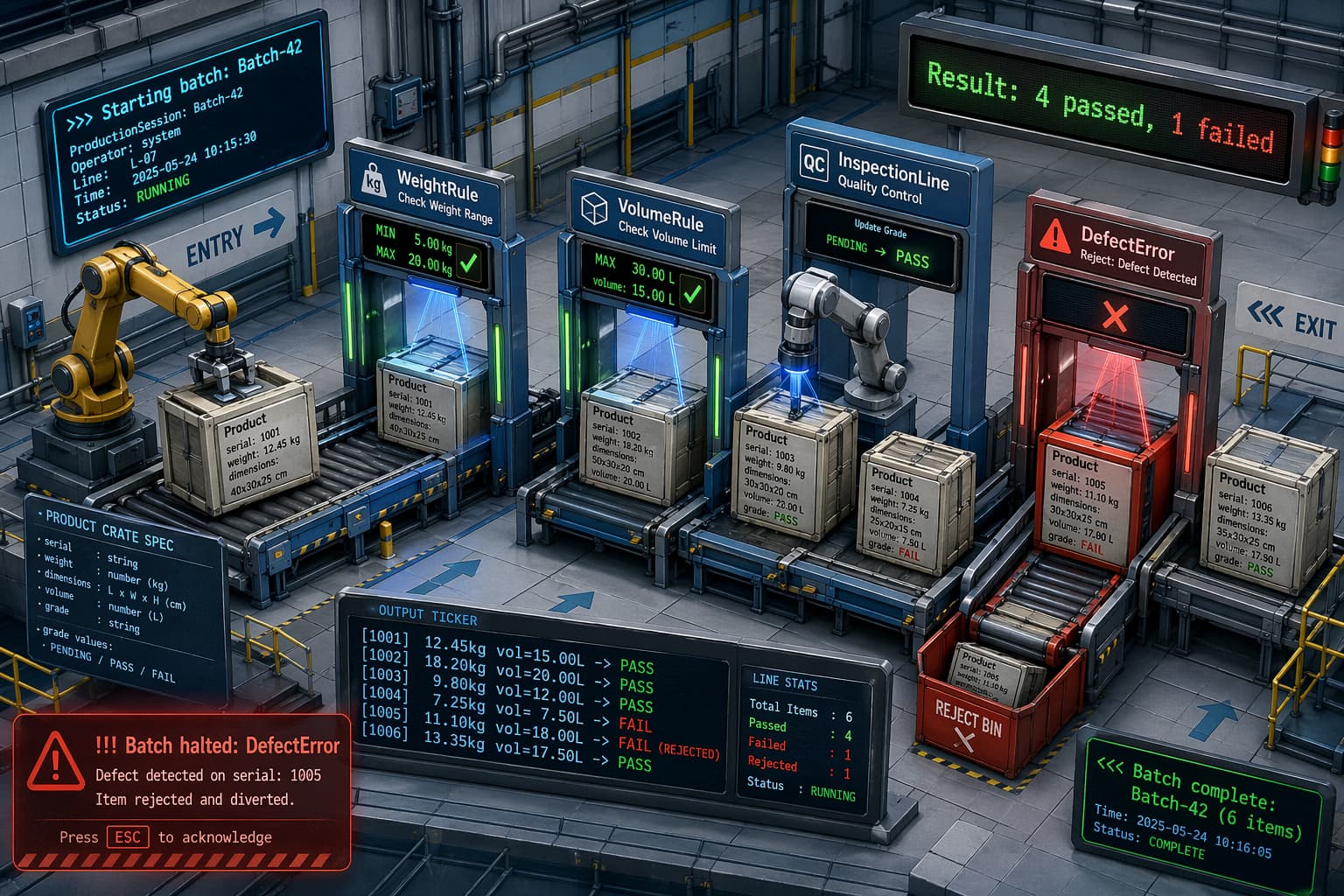
A factory runs production batches where products are inspected against configurable quality rules. Each batch is managed as a session that handles setup, inspection, and cleanup — including graceful handling when a defective product crashes the line.
- Create a custom exception
DefectError. - Create a dataclass
Productthat takes a serial string, a weight float, and a dimensions tuple, with a non-init field_gradedefaulting to"PENDING".- Reject products with non-positive weight or any non-positive dimension by raising
DefectErrorwith a message including the serial. (use__post_init__for validation.) - Provide a
gradeproperty that only accepts"PENDING","PASS", or"FAIL". - Provide a read-only
volumeproperty computed from the three dimensions. __str__returns the format[serial] weightkg vol=volume -> grade.__gt__compares products by volume.
- Reject products with non-positive weight or any non-positive dimension by raising
- Create an abstract class
QualityRulewith an abstract methodcheck(self, product)that returnsTrueif the product passes. - Create
WeightRule(min_w, max_w)— passes if weight is within range (inclusive). - Create
VolumeRule(max_vol)— passes if volume does not exceed the limit. - Create an iterator class
InspectionLine(products, rules)that, on each iteration, applies all rules to the next product, sets its grade to"PASS"or"FAIL"accordingly, and returns the product. - Create a generator function
summary_report(inspection_line)that iterates through anInspectionLine, counts passes and failures, yields the string representation of each product, and finally yields"Result: X passed, Y failed". - Create a context manager class
ProductionSession(batch_name)that:- On enter: prints
>>> Starting batch: batch_nameand returns itself. - Provides
add(self, product)to collect products. - Provides
inspect(self, rules)that creates anInspectionLinewith the products and rules, passes it tosummary_report, and returns the generator.
- On enter: prints
- On exit: if a
DefectErroroccurred, prints!!! Batch halted: messageand suppresses it. Always prints<<< Batch complete: batch_name (N items). - Create a
ruleslist containingWeightRulewith minimum weight0.5and maximum weight10.0, andVolumeRulewith maximum volume500. - Use a
with ProductionSession("Batch-A") as session:block that:- Adds four products:
Product("P001", 2.5, (5, 10, 8)),Product("P002", 1.0, (3, 4, 5)),Product("P003", 12.0, (2, 3, 4)),Product("P004", 0.8, (20, 10, 5)). - Iterates through
session.inspect(rules), printing each line. - Prints the result of comparing
session._products[1] > session._products[2].
- Adds four products:
- Use a
with ProductionSession("Batch-B") as session:block that:- Adds one product:
Product("P005", -1.0, (5, 5, 5))(this triggers aDefectError).
- Adds one product:
Expected Output
>>> Starting batch: Batch-A
[P001] 2.5kg vol=400 -> PASS
[P002] 1.0kg vol=60 -> PASS
[P003] 12.0kg vol=24 -> FAIL
[P004] 0.8kg vol=1000 -> FAIL
Result: 2 passed, 2 failed
True
<<< Batch complete: Batch-A (4 items)

>>> Starting batch: Batch-B
!!! Batch halted: Invalid weight for P005
<<< Batch complete: Batch-B (0 items)
Problem 8 (Advanced+): Paint Color Mixer
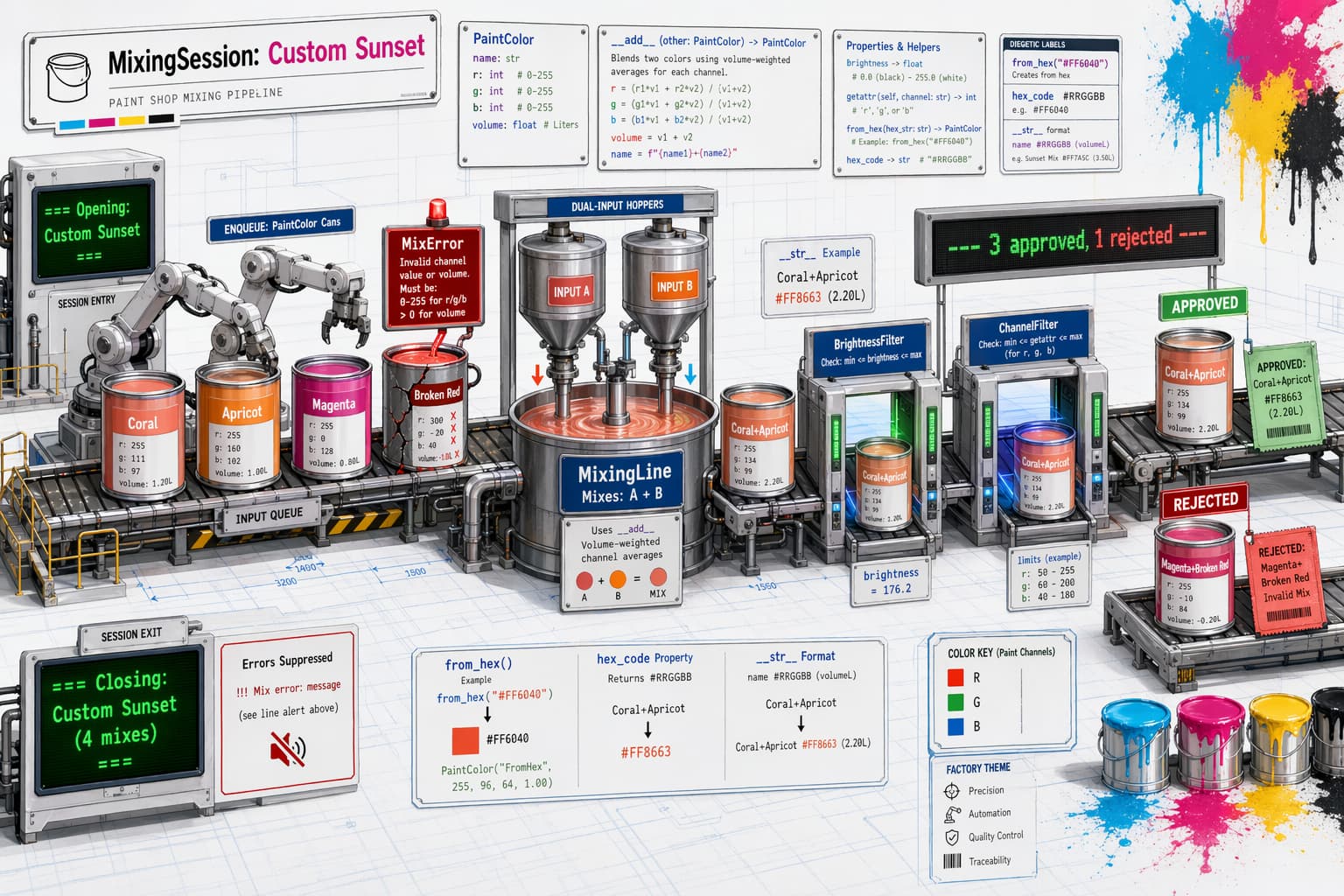
A paint shop mixes custom colors by blending base paints. Each mixing session processes a queue of color pairs, applies quality filters to the results, and manages the session lifecycle — including halting gracefully if a malformed paint is introduced.
- Create a custom exception
MixError. - Create a dataclass
PaintColorthat takes a name string, r, g, and b integers, and a volume float.- Reject any channel outside 0–255 or non-positive volume by raising
MixErrorwith a message including the name. - Provide a
@classmethodfactoryfrom_hex(cls, name, hex_str, volume)that parses a hex string like"#FF6040"into RGB components. Each pair of hex characters (RR, GG, BB) converts from base-16 to a decimal integer: the first digit is multiplied by 16, the second digit is added. Example:3A→ 3 × 16 + 10 = 58 (A=10, B=11, C=12, D=13, E=14, F=15). - Provide a read-only
hex_codeproperty returning the color as#RRGGBB(uppercase). Each channel is converted to hex by: divide by 16 to get the first digit, the remainder is the second digit. Values 10–15 map to A–F. - Provide a read-only
brightnessproperty: the average of the three channels, rounded to 1 decimal. __str__returnsname #RRGGBB (volumeL).__eq__compares two colors by their RGB channels only.__add__mixes two colors: for each channel, multiply each color’s channel value by its volume, add them together, then divide by the total volume — round to the nearest integer. The combined volume is the sum of both volumes, and the name is"name1+name2".
- Reject any channel outside 0–255 or non-positive volume by raising
- Create an abstract class
ColorFilterwith an abstract methodapply(self, color)returningTrueif the color passes. - Create
BrightnessFilter(min_brightness)— passes if brightness meets the minimum. - Create
ChannelFilter(channel, max_val)— passes if the named channel ("r","g", or"b") does not exceedmax_val. Usegetattrto read the channel. - Create an iterator class
MixingLine(pairs, filters)—pairsis a list of tuples, each containing twoPaintColorobjects. On each iteration, adds the next pair of colors together, applies all filters, and returns(mixed_color, passed_bool). - Create a generator function
batch_report(mixing_line)that iterates through aMixingLine, counts approvals and rejections, yields" APPROVED: ..."or" REJECTED: ..."for each mix, and finally yields" --- X approved, Y rejected ---". - Create a context manager class
MixingSession(session_name)that:- On enter: prints
=== Opening: session_name ===and returns itself. __init__storessession_nameand initializesself._pairsas an empty list.- Provides
queue(self, color_a, color_b)to append the pair(color_a, color_b)toself._pairs. - Provides
process(self, filters)that builds the pipeline and returns the generator. - On exit: if a
MixErroroccurred, prints!!! Mix error: messageand suppresses it. Always prints=== Closing: session_name (N mixes) ===.
- On enter: prints
- Create a
filterslist containingBrightnessFilterwith minimum brightness50andChannelFilterwith channel"r"and maximum value200. - Use a
with MixingSession("Morning Batch") as session:block that:- Queues three color pairs:
("Red", 200, 30, 30, 2.0)with("White", 255, 255, 255, 3.0);("Blue", 10, 10, 180, 1.5)with("Green", 20, 160, 20, 1.5); andCoralcreated viafrom_hexwith"#FF6040"and volume1.0paired with("Crimson", 220, 20, 20, 1.0). - Iterates through
session.process(filters), printing each line. - Creates two
PaintColorobjectsc1andc2with identical RGB(100, 100, 100)but volumes1.0and2.0, and prints the result ofc1 == c2.
- Queues three color pairs:
- Use a
with MixingSession("Evening Batch") as session:block that:- Queues one color pair:
("Bad", -10, 0, 0, 1.0)with("OK", 100, 100, 100, 1.0)(this triggers aMixError).
- Queues one color pair:
Expected Output
=== Opening: Morning Batch ===
  REJECTED: Red+White #E9A5A5 (5.0L)
  APPROVED: Blue+Green #0F5564 (3.0L)
  REJECTED: Coral+Crimson #EE3A2A (2.0L)
  --- 1 approved, 2 rejected ---
True
=== Closing: Morning Batch (3 mixes) ===

=== Opening: Evening Batch ===
!!! Mix error: Channel out of range in Bad
=== Closing: Evening Batch (0 mixes) ===