Week 14 Lecture: Intermediate Data Structures & Pythonic Coding
1. Sets
A Set is a built-in data structure in Python that represents an unordered collection of unique elements.
- Unordered: You cannot access items by index (e.g., you cannot do
my_set[0]). The order in which you insert items is not guaranteed to be preserved. - Unique: Sets automatically remove duplicates. If you add the same item twice, it only appears once.

Creating Sets
Just like dictionaries, sets use curly braces {}.
my_set = {1, 2, 3}
The “Empty Set” Trap:
You might think you can create an empty set using empty curly braces {}. However, Python interprets {} as an empty dictionary. To create an empty set, you must use the set() constructor:
empty_dict = {}      # This is a dictionary
empty_set = set()    # This is a set
Converting to Sets: You can convert any collection (lists, tuples, strings) into a set. This is the fastest way to remove duplicates from a list.
# From a list (removes duplicates)
list_to_set = set([1, 2, 2])   # Result: {1, 2}

# From a string (breaks into unique characters)
chars = set('hello')           # Result: {'h', 'e', 'l', 'o'}
Modifying Sets
- Adding: Use
.add(item). - Removing: There are two ways to remove items, and the difference is important:
remove(item): Raises aKeyErrorif the item does not exist.discard(item): Removes the item if it exists; does nothing if it doesn’t. No error is raised.
s = {1, 2, 3}
s.add(4)        # {1, 2, 3, 4}
s.remove(4)     # {1, 2, 3}
s.discard(99)   # No error, even though 99 isn't there
Set Operations (Math)
Sets allow us to compare groups of data efficiently.
| Operation | Operator | Method | Analogy |
|---|---|---|---|
| Union | | |
.union() |
The Guest List. You make a guest list, your friend makes one. Combining them gives you all unique guests. |
| Intersection | & |
.intersection() |
Meeting Friends. You are free some days, your friend is free some days. The intersection is the days you both are free. |
| Difference | - |
.difference() |
To-Do List. List 1 is all assignments. List 2 is finished assignments. The difference is what you have left to do. |
| Symmetric Difference | ^ |
.symmetric_difference() |
Sports Teams. Students who play only football or only basketball, excluding those who play both. |
Code Example:
set_a = {1, 2, 3}
set_b = {3, 4, 5}

# Union (All unique items: 1, 2, 3, 4, 5)
print(set_a | set_b)

# Intersection (Shared items: 3)
print(set_a & set_b)

# Difference (In A but NOT in B: 1, 2)
# Note: Order matters here! (set_b - set_a would be {4, 5})
print(set_a - set_b)

# Symmetric Difference (Unique to A or B, not both: 1, 2, 4, 5)
print(set_a ^ set_b)
Practice Case 1: Access Control System
Scenario: You need to identify security risks and marketing targets by comparing a messy list of all employees against a list of gym members.
def analyze_access(employee_list, member_list):
    # Convert lists to sets to remove duplicates immediately
    emp_set = set(employee_list)
    mem_set = set(member_list)

    # 1. Invalid Members: In gym list, but NOT in employee list
    invalid_members = mem_set - emp_set

    # 2. Verified Members: In BOTH gym list AND employee list
    verified_members = mem_set & emp_set

    # 3. Marketing Targets: Employees who are NOT gym members
    missing_employees = emp_set - verified_members

    return verified_members, missing_employees, invalid_members

# Example usage:
employee_list = ["Alice", "Bob", "Charlie", "David", "Eve", "Alice"]
member_list = ["Alice", "Charlie", "Frank", "Alice", "Bob"]

verified, missing, invalid = analyze_access(employee_list, member_list)
print("Verified Members:", verified)
print("Missing Employees:", missing)
print("Invalid Members:", invalid)
Expected Output:
Verified Members: {'Alice', 'Charlie', 'Bob'}
Missing Employees: {'Eve', 'David'}
Invalid Members: {'Frank'}
Practice Case 2: The Playlist Merger
Scenario: Merging two music libraries to find a “Master Playlist” and a “Discovery Playlist.”
def blend_playlists(list_a, list_b):
    set_a = set(list_a)
    set_b = set(list_b)

    # Union: Combine all songs
    master_playlist = set_a | set_b

    # Symmetric Difference: Songs unique to only one person (XOR)
    discovery_playlist = set_a ^ set_b

    return master_playlist, discovery_playlist

# Example usage:
list_a = ["Song1", "Song2", "Song3", "Song4"]
list_b = ["Song3", "Song4", "Song5", "Song6"]

master, discovery = blend_playlists(list_a, list_b)
print("Master Playlist:", master)
print("Discovery Playlist:", discovery)
Expected Output:
Master Playlist: {'Song1', 'Song5', 'Song6', 'Song2', 'Song3', 'Song4'}
Discovery Playlist: {'Song1', 'Song5', 'Song6', 'Song2'}
2. Advanced Iteration (enumerate & zip)
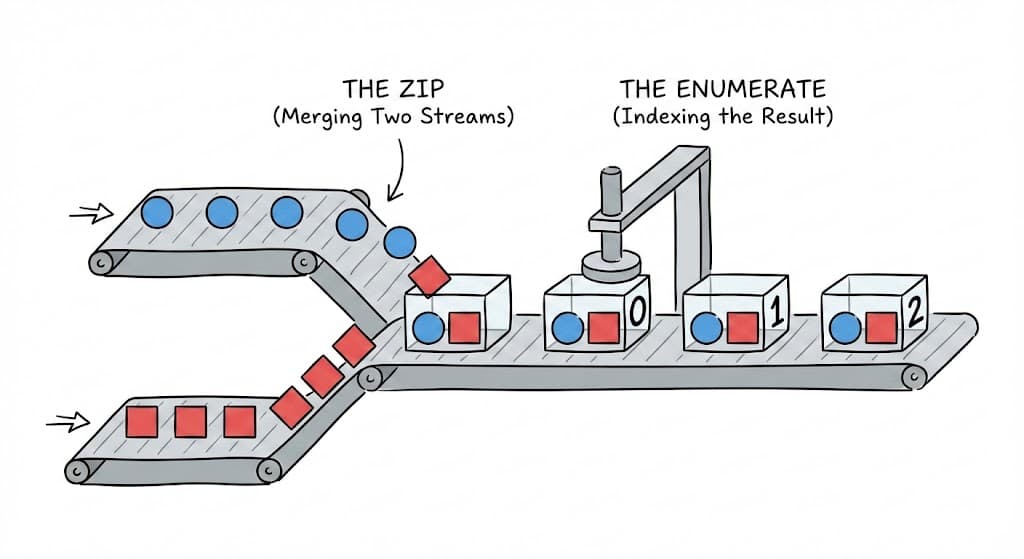
Python provides cleaner ways to loop than using range(len(list)).
Enumerate
When you need both the item and its index (position), use enumerate().
- It returns a tuple
(index, value)on each iteration. - You can specify a
startparameter to begin counting from a number other than 0.
names = ["Alice", "Bob", "Charlie"]

# Bad way:
# for i in range(len(names)):
#     print(i, names[i])

# Pythonic way:
for i, name in enumerate(names, start=1):
    print(f"Rank {i}: {name}")
Zip
When you need to loop over multiple lists simultaneously, use zip().
- It pairs up elements at the same index from each list.
- It stops automatically when the shortest list runs out.
names = ["Alice", "Bob", "Charlie"]
scores = [85, 90, 78]

for name, score in zip(names, scores):
    print(f"{name} scored {score}")
Combining Both:
You can use enumerate on a zip object if you need the index and items from multiple lists.
Practice Case: The Quiz Grader
Scenario: Compare a student’s answers to an answer key and provide specific feedback using the question number.
def grade_quiz(answer_key, student_answers):
    score = 0
    feedback = []

    # We unpack the index (q_num) from enumerate...
    # ...and the pair (correct, actual) from zip
    for q_num, (correct, actual) in enumerate(zip(answer_key, student_answers), start=1):
        if correct == actual:
            score += 1
        else:
            feedback.append(f"Question {q_num}: Expected {correct}, got {actual}")

    return score, feedback

# Example usage:
answer_key = ["A", "B", "C", "D", "A"]
student_answers = ["A", "C", "C", "D", "B"]

score, feedback = grade_quiz(answer_key, student_answers)
print("Score:", score)
print("Feedback:")
for item in feedback:
    print(" ", item)
Expected Output:
Score: 3
Feedback:
  Question 2: Expected B, got C
  Question 5: Expected A, got B
3. List & Dictionary Comprehensions
Comprehensions allow you to create new lists or dictionaries based on existing ones in a single, readable line. They generally follow this pattern:
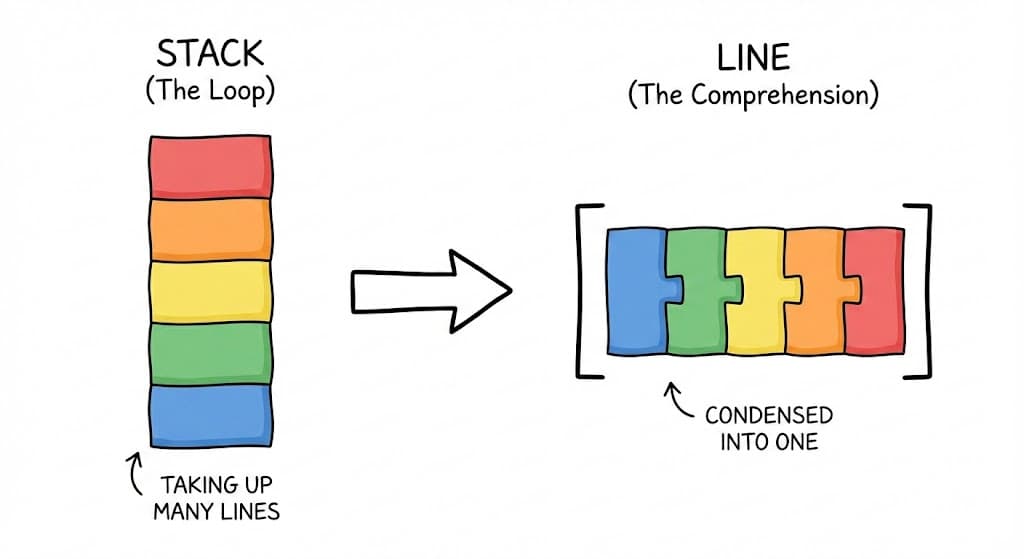
[expression for item in iterable if condition]
The Logic Steps
Imagine we want squares of even numbers from [1, 2, 3, 4, 5].
- Loop:
for n in numbers - Filter:
if n % 2 == 0 - Expression:
n ** 2 - Collection Type: Wrap in
[]for list,{}for set/dict.
numbers = [1, 2, 3, 4, 5]

# List Comprehension
squares = [n ** 2 for n in numbers if n % 2 == 0] # [4, 16]

# Set Comprehension
unique_squares = {n ** 2 for n in numbers}

# Dictionary Comprehension (Key: Value)
square_dict = {n: n**2 for n in numbers}          # {1: 1, 2: 4, ...}
Note on Tuples:
Putting parentheses around a comprehension (n for n in numbers) does not create a tuple. It creates a Generator (see Section 4 for more on Iterators). To create a tuple, you must cast it explicitly: tuple(n for n in numbers).
Practice Case: Text Analyzer
Scenario: Extract keywords longer than 3 letters from a sentence, uppercase them, and map them to their lengths.
text = "python is an amazing programming language for beginners"

# 1. List Comprehension: Filter > 3 chars, Transform to UPPER
keywords = [word.upper() for word in text.split() if len(word) > 3]

# 2. Dictionary Comprehension: Map word -> length
word_metrics = {word: len(word) for word in keywords}

print("Keywords:", keywords)
print("Word Metrics:", word_metrics)
Expected Output:
Keywords: ['PYTHON', 'AMAZING', 'PROGRAMMING', 'LANGUAGE', 'BEGINNERS']
Word Metrics: {'PYTHON': 6, 'AMAZING': 7, 'PROGRAMMING': 11, 'LANGUAGE': 8, 'BEGINNERS': 9}
4. Functional Programming (lambda, map, filter)
Lambda Functions
A lambda is an anonymous (nameless), single-line function. It is useful when you need a short function for a quick operation, like a custom sorting rule.

Syntax: lambda arguments: expression (No return keyword needed).
# Standard function
def add_five(x):
    return x + 5

# Equivalent Lambda
add_five_lambda = lambda x: x + 5
Practical Use: Custom Sorting
The most common use of lambda is with the key argument in sort(), min(), or max().
prices = [("apple", 15), ("banana", 5), ("cherry", 10)]

# Sort by price (index 1), descending (using negative value)
prices.sort(key=lambda item: -item[1])
# Result: [('apple', 15), ('cherry', 10), ('banana', 5)]
Map and Filter (Lazy Evaluation)
These functions apply a rule to a sequence. Crucially, they return Iterators, not lists.
map(func, iterable): Appliesfuncto every item.filter(func, iterable): Keeps items wherefuncreturnsTrue.
Understanding Iterators (Lazy Evaluation): Iterators do not store all values in memory at once. They generate the next value only when asked (e.g., in a loop).
- They are “One-time use”: Once you loop through an iterator, it is empty.
- You can use
next(iterator)to get the next item manually. - To see all items at once, convert to a list:
list(my_iterator).
nums = [1, 2, 3, 4]

# Map: Double the numbers
doubled = map(lambda x: x * 2, nums)

# Filter: Keep evens
evens = filter(lambda x: x % 2 == 0, nums)

# Must convert to list to print/view results
print(list(doubled))  # [2, 4, 6, 8]
print(list(evens))    # [2, 4]
Practice Case: Inventory Sorter
Scenario: Filter items that need restocking (< 10 qty) and sort inventory by total value (Qty * Price).
inventory = [
    ("Widget A", 50, 2.0),
    ("Widget B", 5, 10.0),
    ("Widget C", 8, 100.0),
    ("Widget D", 2, 5.0)
]

# 1. Filter restock items
restock_list = list(filter(lambda item: item[1] < 10, inventory))

# 2. Sort by Total Value (Quantity * Price) using lambda
inventory.sort(key=lambda item: item[1] * item[2], reverse=True)

print("Restock List:", restock_list)
print("Sorted Inventory by Total Value:", inventory)
Expected Output:
Restock List: [('Widget B', 5, 10.0), ('Widget C', 8, 100.0), ('Widget D', 2, 5.0)]
Sorted Inventory by Total Value: [('Widget C', 8, 100.0), ('Widget A', 50, 2.0), ('Widget B', 5, 10.0), ('Widget D', 2, 5.0)]