Databases | Practical class 6
Using UNION, INTERSECT, and EXCEPT in PostgreSQL
Introduction to Set Operations
Set operations in SQL treat the results of SELECT statements like mathematical sets, allowing you to combine or compare them. The three operations we will cover are:
- UNION: Combines the result sets of two or more
SELECTstatements into a single result set, removing duplicate rows. - INTERSECT: Returns only the rows that appear in all specified
SELECTstatements. - EXCEPT: Returns the rows from the first
SELECTstatement that do not appear in the subsequentSELECTstatements.
Setting Up Sample Tables
To demonstrate these operations, we will use two simple tables: math_enrollments and science_enrollments. Each table lists students enrolled in math or science courses, with columns for student_id (integer) and student_name (text).
Run the following SQL commands in the pgAdmin 4 SQL editor to create and populate these tables:
CREATE TABLE math_enrollments (
    student_id integer,
    student_name text
);

CREATE TABLE science_enrollments (
    student_id integer,
    student_name text
);

INSERT INTO math_enrollments (student_id, student_name) VALUES
(1, 'AZIMJON'),
(2, 'SHOHZODBEK'),
(3, 'SULTONBEK');

INSERT INTO science_enrollments (student_id, student_name) VALUES
(2, 'SHOHZODBEK'),
(4, 'XAYRULLO'),
(5, 'AZIZBEK');
After executing these commands, your tables are ready. In pgAdmin 4, the output will confirm the tables are created and data is inserted successfully.
UNION: Combining Results
The UNION operation combines the results of two or more SELECT statements into a single result set, automatically removing duplicates.
Syntax
SELECT column1, column2, ... FROM table1
UNION
SELECT column1, column2, ... FROM table2;
Example
To get a list of all students enrolled in either math or science:
SELECT student_id, student_name FROM math_enrollments
UNION
SELECT student_id, student_name FROM science_enrollments;
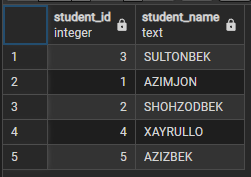
Execute this query in pgAdmin 4. The result appears in the Data Output tab:
Explanation
- The result includes all unique students from both tables.
- Bob, who is in both
math_enrollmentsandscience_enrollments, appears only once becauseUNIONremoves duplicates.
UNION ALL Variant
If you want to include duplicates (if they exist), use UNION ALL:
SELECT student_id, student_name FROM math_enrollments
UNION ALL
SELECT student_id, student_name FROM science_enrollments;
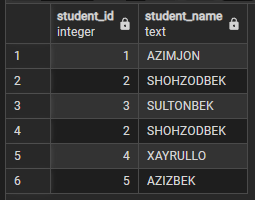
In our sample data, there are no duplicate rows, so the result is identical to UNION. However, UNION ALL runs faster because it does not check for duplicates.
INTERSECT: Finding Common Rows
The INTERSECT operation returns only the rows that appear in all specified SELECT statements.
Syntax
SELECT column1, column2, ... FROM table1
INTERSECT
SELECT column1, column2, ... FROM table2;
Example
To find students enrolled in both math and science:
SELECT student_id, student_name FROM math_enrollments
INTERSECT
SELECT student_id, student_name FROM science_enrollments;
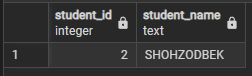
Execute this query. The result is:
Explanation
- Only Bob appears in both tables, so he is the sole row returned.
INTERSECTcompares entire rows, so bothstudent_idandstudent_namemust match.
EXCEPT: Finding Differences
The EXCEPT operation returns rows from the first SELECT statement that do not appear in the second SELECT statement.
Syntax
SELECT column1, column2, ... FROM table1
EXCEPT
SELECT column1, column2, ... FROM table2;
Example 1: Math but Not Science
To find students enrolled in math but not in science:
SELECT student_id, student_name FROM math_enrollments
EXCEPT
SELECT student_id, student_name FROM science_enrollments;
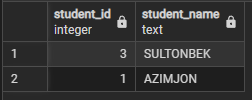
Result:
Example 2: Science but Not Math
To find students enrolled in science but not in math:
SELECT student_id, student_name FROM science_enrollments
EXCEPT
SELECT student_id, student_name FROM math_enrollments;
Result:
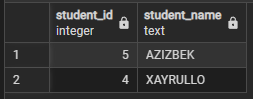
Explanation
- In Example 1, Alice and Charlie are in
math_enrollmentsbut not inscience_enrollments. - In Example 2, David and Eve are in
science_enrollmentsbut not inmath_enrollments. - The order of
SELECTstatements matters withEXCEPT, unlikeUNIONandINTERSECT.
Key Requirements and Notes
To use set operations successfully in PostgreSQL:
- Column Count: Each
SELECTstatement must return the same number of columns. - Data Types: Corresponding columns must have compatible data types (e.g., integer with integer, text with text).
- Column Names: The result set uses column names from the first
SELECTstatement. - Duplicates:
UNIONandINTERSECTremove duplicates; useALL(e.g.,UNION ALL) to keep them. - Multiple Operations: You can chain operations, e.g.,
SELECT ... UNION SELECT ... UNION SELECT ....
Common Pitfalls
- Mismatched Columns: This fails:
SELECT student_id FROM math_enrollments
UNION
SELECT student_name FROM science_enrollments;
Error: Data types (integer vs. text) do not match.
- Different Column Counts: This fails:
SELECT student_id, student_name FROM math_enrollments
UNION
SELECT student_id FROM science_enrollments;
Error: Unequal number of columns.